
My self-hosted instance is broken
Symptoms on an instance you run: a build that stops, a variable that does nothing, egress that fails, a proxy that buffers, and a lockout you built yourself.
Browse documentation
25 providers
Alibaba CloudAnthropicAzure OpenAIAWS BedrockCerebrasCohereDeepseekGoogle GeminiGroqLM StudioLocalAIMetaYour instance reports its own state in two places.
| Where | What it reports |
|---|---|
| the boot line, at build and at start, in the container log | 🧠 big-AGI v<pkgVersion> (@<buildHash>, N:<nodeEnv>) |
/dev/debug -> the Backend card | the live capability list the server computed - booleans only, key values never sent to the browser |
Everything here happens on an instance somebody runs. Run it yourself carries the configuration and deploy procedures; the symptoms are here.
Error messages map
The exact string, its meaning, and the section that fixes it:
| What you see | What it means | Fix |
|---|---|---|
❌ Invalid environment variables: and the build stops | A variable holds a malformed URL | below |
| A variable is set and nothing changed | A NEXT_PUBLIC_* name, an empty value, or a name that never reached the process | below |
Missing <Vendor> API Key although the variable is set | The server did not read it, or the UI is overriding it | below |
[<Vendor> network issue]: Could not connect: + Please make sure the Server can access -> <url> | Your server cannot reach that address | below |
Unauthorized · Unauthorized/Unconfigured before the app loads | Basic auth is compiled in, and its variables are unset | below |
| Answers arrive all at once, or long generations die | The proxy in front is buffering or timing out | below |
**Request too large** on your own deployment | Your proxy's body limit, not Big-AGI's | below |
| The microphone does nothing on a LAN address | Not a secure context, so the browser withholds the API | below |
Invalid WSS browser endpoint · Missing API Key or Custom Search Engine ID · Missing ElevenLabs API key | An optional service is half-configured | below |
| Ollama's Pull times out part-way | Expected on an edge function; the download resumes | below |
Invalid environment variables
The build stopped, not the server: validation runs at build time and prints the offending names. Every variable in the schema is optional, so what fails is a malformed value.
❌ Invalid environment variables:

URL-checked names   the *_API_HOST family, AZURE_OPENAI_API_ENDPOINT,
                    PUPPETEER_WSS_ENDPOINT, NEXT_PUBLIC_PLANTUML_SERVER_URL
OPENAI_API_HOST=api.openai.com           fails
OPENAI_API_HOST=https://api.openai.com   passes
- Give each of those a scheme, then rebuild.
- Removing a variable entirely is always valid, because nothing is required (configure your instance).
I set the variable and nothing changed
Three causes produce the same result: nothing changes.
| Cause | What is happening |
|---|---|
a NEXT_PUBLIC_* name | compiled into the browser bundle at build time, so docker run -e on a prebuilt image does nothing |
| an empty value | OPENAI_API_KEY= is treated as absent, deliberately, so a half-filled secrets file is predictable |
| the name never reached the process | the Backend card at /dev/debug - the capability boolean is the proof |
The message of the day, Drive import, analytics and the PlantUML server are all NEXT_PUBLIC_*: rebuild with the value set. Cerebras, Sakana and Modular do not surface as booleans, and AIX_STRICT_PARSING is not reported at all.
When a release moves a vendor's model definitions, or the server holds a key for a service the browser has not created yet, that browser refreshes the affected services once on its next load. A failure logs Auto-configuration failed for service: and does not stop the others (build time and run time).
Missing <Vendor> API Key and the variable is set
The guard fires when no key reached the request, which is not the same as no key being configured. Precedence is identical at every AI service: UI setting, then server environment variable, then in-code default.
- Confirm the server read it -
/dev/debug, or a key field showingAlready set on server. - A key typed into the UI takes precedence over the server's; clear that field to fall back to the deployment's (keys and access control).
- One inversion exists, for security: the Bedrock region comes from the server and the client's value is ignored.
Could not connect:
Your server could not reach the address it was given.
[<Vendor> network issue]: Could not connect: <reason>.
Please make sure the Server can access -> <url>
- Test reachability from inside the container or pod, not from your laptop - egress rules differ.
localhostinside a container is the container; point at the host's address. A model runtime on127.0.0.1is a different problem with a different fix (my local models don't show up).- That reachability line is appended to 404 and 502 responses as well, and to 403. On a 403 it misleads: the request arrived and was refused (403 Forbidden).
Unauthorized/Unconfigured
HTTP basic auth is compiled in and its credentials are unset. The middleware is a file you added to the build (basic auth in the app), so this state means the file went in and the environment did not follow.
| What you see | What it means |
|---|---|
Unauthorized/Unconfigured | the credentials are unset |
Unauthorized | credentials were sent and did not match |
| server log: | HTTP Basic Authentication is enabled but not configured |
- Set the two credential variables, then restart the container or redeploy the Vercel project.
- To back it out, delete
middleware.tsand build again.
It covers every page and API route, so a lockout is total. Authentication in front of the app needs no rebuild (keys and access control).
Answers arrive all at once, or a stream dies
The proxy in front is buffering or timing out. The transport is a long-lived chunked JSON response on /api/edge and /api/cloud, not SSE. A proxy that buffers holds the whole answer until generation finishes.
- Stop buffering and caching on
/api/*. - Raise read, send and connect timeouts well past a long generation, and the request body limit with them.
- Pass
UpgradeandConnectiononly if you want the dev-tools websocket.
The directives are on behind a reverse proxy. A gateway answering with its own HTML page produces a different string: **Network issue**.
Request too large from my proxy
A 413 from a layer in front of the application - your reverse proxy or your platform's ingress, not Big-AGI. Off the hosted build the card says so, suggesting "If self-hosting, raise the request size limit on your server or proxy".
- Raise the body limit on the proxy that fronts the app, and on the platform ingress where there is one.
- Restart and resend; nothing retries a 413 automatically, because a retry cannot succeed.
The microphone does nothing on my LAN address
Microphone, clipboard and screen capture are secure-context browser APIs. http://localhost counts as secure and http://192.168.x.x does not, so on a LAN address the browser withholds them and shows nothing.
- Put the instance behind HTTPS (HTTPS).
- Or reach it as
localhostfrom the machine that runs it. For local development the repository shipsnpm run dev-https.
A capability is configured and does nothing
Each optional service refuses in its own words, and the string names which one.
| What you see | Which service |
|---|---|
Invalid WSS browser endpoint | Page fetching |
Missing API Key or Custom Search Engine ID | Web search - failures from Google come back as Google Custom Search API error: <message> |
Missing ElevenLabs API key | Voice |
- Configure the one that failed (optional services), then confirm the server read it at
/dev/debug. - A
staticbuild has no server at all, so server-side keys, page fetching and basic auth are absent by construction rather than misconfigured.
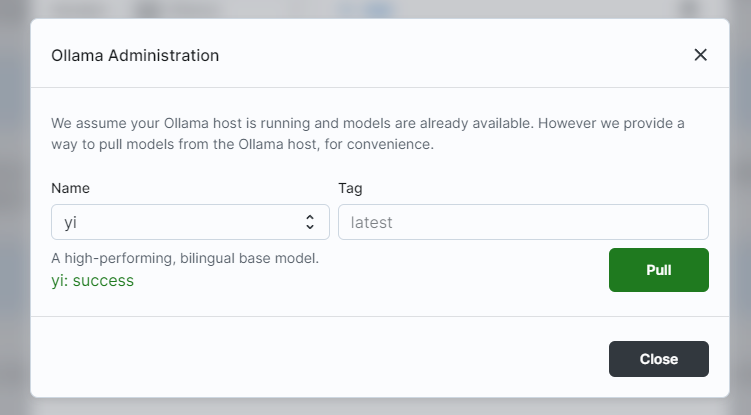
Ollama Pull times out
The in-app Ollama Admin pull runs against an edge function, which times out part-way through a large model.
- Press Pull again until a green message appears - the model server keeps the partial download and resumes.
- Or pull on the machine running Ollama, then refresh the list here.
None of these match
Attach /dev/debug -> Download debug JSON: it carries capability booleans and build info, and no key values. The client-side log is Settings > Tools > Logs Viewer, under Diagnostics. Never paste an env file, a key or conversation content. Where to send it.
Update Required
Big-AGI was redeployed while this tab kept running. The loaded app no longer matches the deployed files. Nothing is broken and there is nothing to report.
- Press Reload Big-AGI. The screen says as much: "Reloading should fetch the current version."
Oops, we hit a snag
Anything else that stopped the app. This is the one worth sending in.
- Expand Error Details (Dev) and copy the message and stack.
- Remove anything of yours from what you copied.
- Send it through Contact Support on that same screen. On the hosted app it opens a message to the builder; on a build you deployed it opens the GitHub form.
- Press Reload Big-AGI.
Where to send new error messages
A string that is not here is a gap in the documentation - report it and the row gets added. The GitHub form is 🔥 Make AI Fix This, the same form the app opens as Auto-Fix Issue. Paste the exact string rather than a paraphrase, and attach /dev/debug -> Download debug JSON - capability booleans and build info, no key values.
Never paste an env file, an API key, or the content you were working on. The GitHub issue form is world-readable and permanent.
Related
BIG-AGI
Resources
© 2026 Token Fabrics·Built with passion in San Diego