
Run it yourself
What the Open branch gives you, which pieces hosted operates that you configure yourself, and every way to install, verify and update your own instance.
Browse documentation
24 providers
Alibaba CloudAnthropicAzure OpenAIAWS BedrockCerebrasCohereDeepseekGoogle GeminiGroqLM StudioLocalAIMetaYou run the Open branch. Everything here applies to the open-source main branch on a machine you control: the same product the hosted site runs, with the pieces hosted operates for you left in your hands. The code lives on GitHub - if Open serves you, star the repo.
The Open branch is the product: the same AI services and models, multi-model answers and every way to combine them, voice, images, attachments, export. It is a strict subset of the code the hosted site runs, never a fork. AI service support is authored here first, so the Open branch gets new model support before hosted does.
What hosted does that you configure
| On your instance | On hosted | |
|---|---|---|
| Personas | The creator, plus the roles built into the code | Editable entities: dashboard, editor, comparison |
| Accounts, cloud backup, sync | None - the Open branch has no sign-in of its own | Account, and backup with sync on Pro |
| Page fetching, web search, premium voice | You point them at services you run | Provided by the hosted service |
Everything absent from that table is identical in both.
Chats, personas, rambles and notifications stay on this device and browser only, unless you subscribe to Pro: cloud backup and multi-device sync (1 GB). On Open there is no sync. Disabling sync never deletes local data.
Two parties carry a request on an instance you run: the browser, and the server you operate. Nothing of ours sits between them.
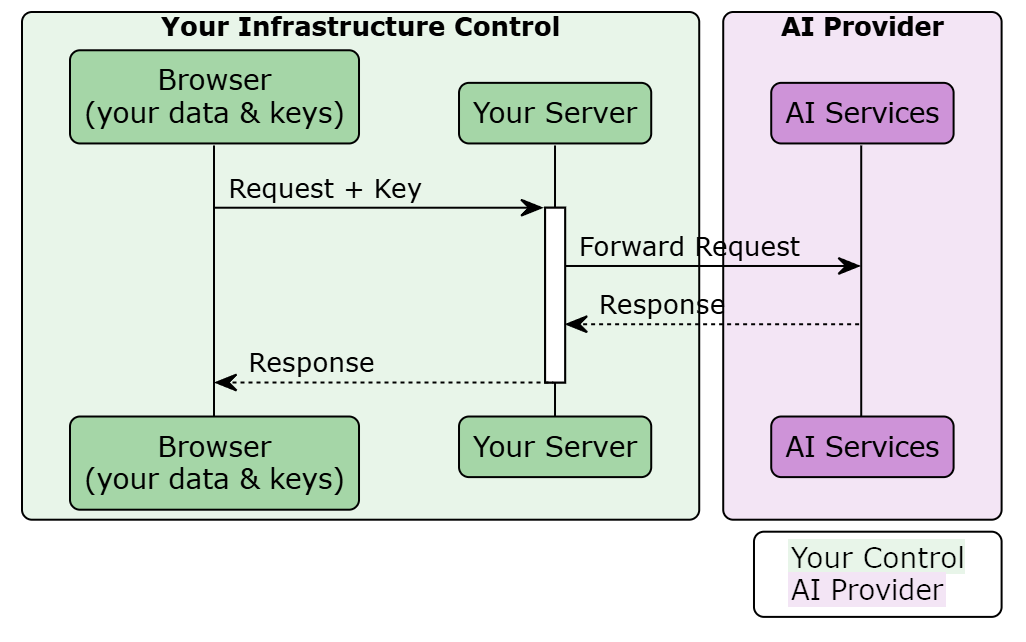
What you need
| Requirement | What it takes |
|---|---|
| machine | one, running a container or Node |
| port | one HTTP port; the image listens on 3000 |
| storage | none to plan for - conversations, settings and keys sit in each visitor's browser |
| domain | and a certificate, only when you expose it past your own network |
| keys | yours held server-side, each person's own, or both |
Put authentication in front the moment anyone but you can reach it: Keys and access control.
Running a model on your own hardware is a separate choice, hosted users included: Models on your own machine. Hosting changes who owns the middle hop, not the route itself: What leaves the browser.
Docker
Docker serves the application; it does not save your chats. The app runs in each visitor's browser, and each browser keeps its own chats locally. Chats synchronized across your devices is our Pro offering (Open, Free, or Pro).
The fastest way from nothing to a working instance. The published image carries a finished build; your keys go in as environment variables at start.
docker run -d --name big-agi -p 3000:3000 \
  -e OPENAI_API_KEY=sk-... \
  ghcr.io/enricoros/big-agi:latest
Then open http://localhost:3000. The key is optional: with none set, each person adds their own inside the app.
| Property | What it means |
|---|---|
| user | uid and gid 1001, unprivileged - a bind-mount must be readable by it |
| port | from PORT, default 3000: -e PORT=8080 -p 8080:8080 moves it |
| telemetry | Next.js's own is off in every image built from this Dockerfile |
| Tag | Points at |
|---|---|
latest | the newest release |
stable | the same image as latest |
2.x.y, v2.x.y | that exact release, permanently |
development | every push to main |
Both linux/amd64 and linux/arm64 are built on native runners, so Apple silicon and Arm servers pull a native image. Inside a container 127.0.0.1 is the container: a model runtime on the host machine is host.docker.internal on macOS and Windows, the host's LAN address on Linux.
Linux has a second option when the LAN address does not work: docker run --network="host" ... puts the container on the host's network stack, so 127.0.0.1 reaches host services again. It also drops the container's network isolation.
Opinion, July 2026: pin a version tag for anything you would miss if it changed under you. Take latest on a personal box; development is every commit to main.
Compose
Compose keeps the setup in a file you edit and re-apply, which makes updates one command. The repository root carries a minimal file:
services:
  big-agi:
    image: ghcr.io/enricoros/big-agi:latest
    ports:
      - "3000:3000"
    env_file:
      - .env
docker compose up -d starts it. It declares no volumes and no restart policy - add restart: unless-stopped if you want it back after a reboot. A second file, docs/docker/docker-compose-browserless.yaml, adds the headless browser page fetching needs: Turn on the optional services.
Vercel
This link clones the repository into a new Vercel project: the form arrives with OPENAI_API_KEY on it and the project named big-AGI. The longer path is a fork you import yourself - Vercel's own procedure. Two things are ours:
- Two runtimes, split on purpose:
/api/edgecarries all model traffic, search, speech and YouTube transcripts;/api/cloudruns on Node and carries page fetching and share links. NEXT_PUBLIC_DEPLOYMENT_TYPEis set for you, tovercel-<environment>. Never set it yourself.
From source
| Requirement | Value |
|---|---|
| Node | ^26.0.0 || ^24.0.0 || ^22.0.0 (engines in package.json); .nvmrc selects the newest |
git clone https://github.com/enricoros/big-AGI.git
cd big-AGI
npm install
npm run build
npm run start        # http://localhost:3000
npm installrunsprisma generateafterwards whether or not you have a database. An install that dies there is an install failure, not a database problem.- Variables are validated when you build, not when a request arrives: a host written without its scheme stops
npm run build. npm run dev-httpsserves the development server over TLS - the microphone and clipboard need a secure context on any address other thanlocalhost.
Kubernetes
Two manifests live under docs/k8s/. Fill the secret template first. A Kubernetes Secret holds its values Base64-encoded rather than encrypted, so never commit env-secret.yaml once your keys are in it.
kubectl apply -f docs/k8s/env-secret.yaml
kubectl apply -f docs/k8s/big-agi-deployment.yaml
You get the ns-big-agi namespace, one replica of the published image on container port 3000, and a ClusterIP service. The names are fixed by the manifests, so the check and the tunnel are fixed too:
$ kubectl -n ns-big-agi get svc,pod,deployment
NAME                  TYPE        CLUSTER-IP     EXTERNAL-IP   PORT(S)    AGE
service/svc-big-agi   ClusterIP   10.0.198.118   <none>        3000/TCP   63m

NAME                                 READY   STATUS    RESTARTS   AGE
pod/deployment-big-agi-xxxxxxxx-yyy  1/1     Running   0          39m

NAME                                 READY   UP-TO-DATE   AVAILABLE   AGE
deployment.apps/deployment-big-agi   1/1     1            1           63m

$ kubectl -n ns-big-agi port-forward service/svc-big-agi 3000:3000
Forwarding from 127.0.0.1:3000 -> 3000
You do not get an Ingress, liveness or readiness probes, resource requests or limits, or autoscaling. Add those before this carries anyone's load.
Anything else running a container or Node works. Cloudflare Pages does not: it builds Edge-only, so the published procedure deletes app/api/cloud/[trpc]/route.ts - the whole Node router behind page fetching.
Verify it worked
| Check | What you should see |
|---|---|
http://<host>:3000 | the chat renders |
docker logs big-agi | 🧠 big-AGI v<version> (@<build hash>, N:production) |
/dev/debug -> Backend | what the server picked up, and the build it is running · deploymentType: docker under Docker, vercel-<environment> on Vercel |
One warning about that last check: /dev/* reports your configuration to anyone who can load it, and the in-app password does not cover it.
Update
An update is three moves: get the new version, rebuild if you build your own, restart. Nothing on the server migrates - no schema version, no data directory, no server-held user state.
docker compose pull && docker compose up -d
One thing updates itself, in each browser rather than on your server:
| Step | What happens |
|---|---|
| sent to the browser | which vendors the server holds keys for, and a per-vendor model-definitions version |
| a trigger | a vendor's definitions version moved with a release · a server-configured service the browser has not created yet |
| the browser then | creates the missing services, re-fetches the affected model lists, re-picks the model assigned to each job - once, on next load |
Rotating a key triggers nothing, deliberately: keys are read per request, so the new value is simply used.
Nobody opens Models, and one service failing does not stop the rest.
Rollback
Pin the previous version tag and restart. Nothing migrated, so that is the whole rollback; browsers re-scan once more on next load. Your environment file is the one thing on the server you cannot regenerate. Everyone's conversations live in their own browser, so updates, rebuilds and rollbacks leave them alone.
Fails without an error
| What happens | How to tell |
|---|---|
A NEXT_PUBLIC_* value handed to a running container is ignored | The feature stays absent; those five compile in at build |
Nothing probes the app: no HEALTHCHECK is defined, in the image or in Compose | Point your own probe at / on the app port |
| On Vercel, a long page fetch is cut at your plan's function timeout | The repository ships no vercel.json, so nothing raises the limit |
| The bundled Kubernetes secret template is missing variables that exist | Nothing reports the gap; take the list from Environment variables |
A build made outside a git checkout reports its hash as 2-dev | The boot line and the Backend card both show it |
Symptoms after any of this belong in one place: My self-hosted instance is broken.
BIG-AGI
Resources
© 2026 Token Fabrics·Built with passion in San Diego