
Connect LM Studio
Three things have to be true before Big-AGI can reach LM Studio: the server running, CORS enabled, and Direct Connection on. The address is prefilled.
Browse documentation
24 providers
Alibaba CloudAnthropicAzure OpenAIAWS BedrockCerebrasCohereDeepseekGoogle GeminiGroqLM StudioLocalAIMetaLM Studio runs a server on your own machine, and Big-AGI connects to it by address, with no key involved. The hosted app uses that address exactly as a self-hosted one does (models on your own machine).
Three things have to be true before it works: the server is running, CORS is enabled, and Direct Connection is on.
Install and download a model
Install from lmstudio.ai and download at least one model. Weights are large and speed depends on your RAM and GPU, so start with a small one.
Every downloaded model is listed, loaded or not. Just-in-Time Model Loading, in Server Settings, loads one on its first request; with that switch off, only an already-loaded model answers.
Starting the server and enabling CORS
- Start the server: run
lms server start, or open the Developer tab and switch Status fromStoppedtoRunning(LM Studio's instructions). - It listens on port
1234, so the base address ishttp://localhost:1234. Openinghttp://127.0.0.1:1234/v1/modelsin a browser tab shows what it serves, independently of Big-AGI. - Turn on Enable CORS: in the Developer tab press Server Settings, then switch it on. Without it LM Studio answers your terminal and refuses your browser, whichever address you use (server settings).
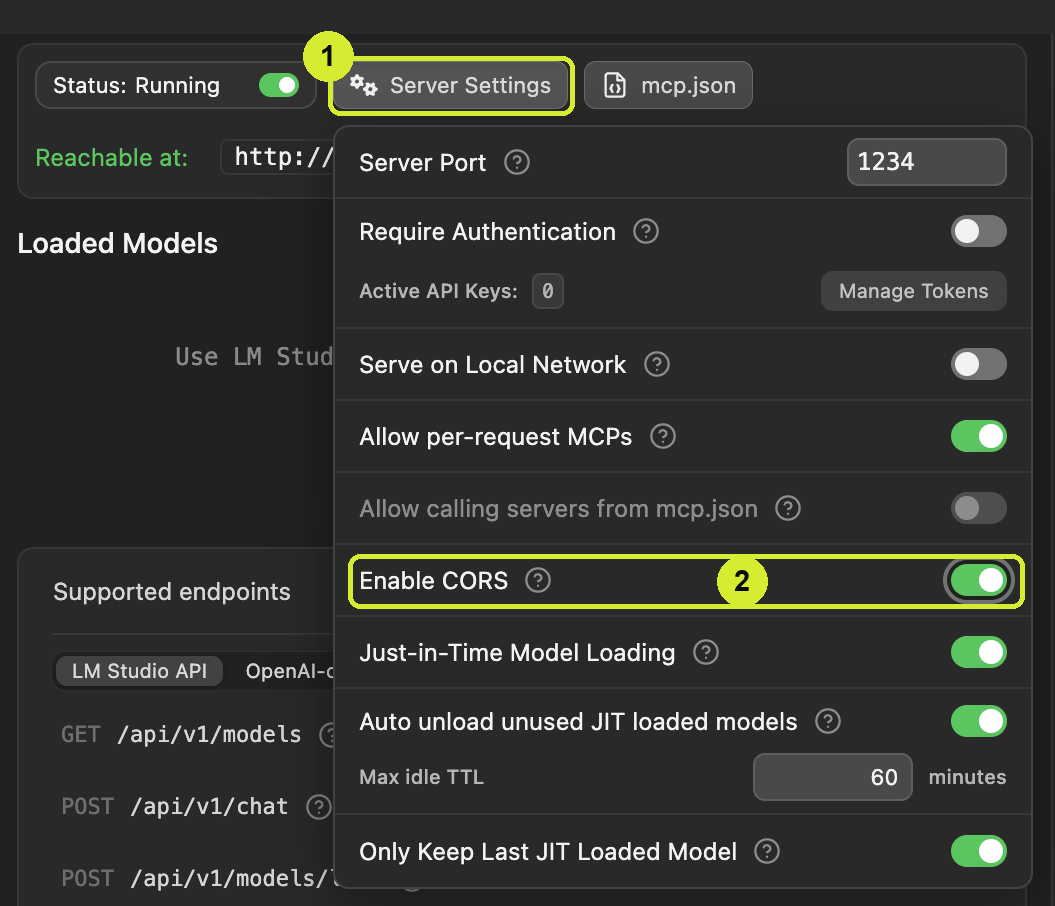
The address, prefilled
Open Models with Ctrl + Shift + M, press More Services if the Setup AI Models wizard shows, then Add -> LM Studio. LM Studio API arrives prefilled with http://localhost:1234. Press Models (add and manage your keys).
Direct Connection
Direct Connection starts off, and for LM Studio you have to turn it on - on a self-hosted Open build the toggle sits behind Advanced. It is not a speed option here: with it off the request is made by Big-AGI's edge servers, which cannot reach an address on your own machine. On, your browser talks to LM Studio directly - which is the reason LM Studio needs CORS.
Direct Connection works only with your API key stored in the browser, and with an AI service that permits direct browser calls (CORS). Where it cannot be used, requests route through the Big-AGI fast edge servers instead - everything still works, within the standard upload size and time limits.
When this doesn't work
| What you see | What it means | What to do |
|---|---|---|
| The panel asks you to enable CORS | LM Studio is reachable but refuses your browser's origin. | Enable CORS above, then press Models |
[LM Studio network issue]: Could not connect: | The server is stopped, the address is wrong, or Direct Connection is off. | I don't see the model I want |
Related
BIG-AGI
Resources
© 2026 Token Fabrics·Built with passion in San Diego