
An hour of speech, transcribed wholenew
Long-form dictation: record up to an hour and transcribe the whole take with Deepgram or OpenAI. Record on mobile, use the transcript immediately on desktop.
Browse documentation
24 providers
Alibaba CloudAnthropicAzure OpenAIAWS BedrockCerebrasCohereDeepseekGoogle GeminiGroqLM StudioLocalAIMetaRamble is long-form stream-of-consciousness interaction: one recording of up to 60 minutes, transcribed whole. Crash-proof: a reload costs five seconds at most. Capture is raw: echo cancellation, noise suppression and automatic gain are requested off. The transcription service hears what your microphone heard.
Ramble is part of Free and Pro only. On Open, voice input is the standard browser microphone, which transcribes live as you speak (see Voice: talk to it).
Start a take
Four ways in, all opening the same panel:
| Where | What you click |
|---|---|
| Desktop left nav | the Ramble icon |
| Mobile drawer | the Ramble menu item |
| Attachments menu | Ramble · Record audio and transcribe it |
| Mobile, when minimized | the red bubble, back into the running take |
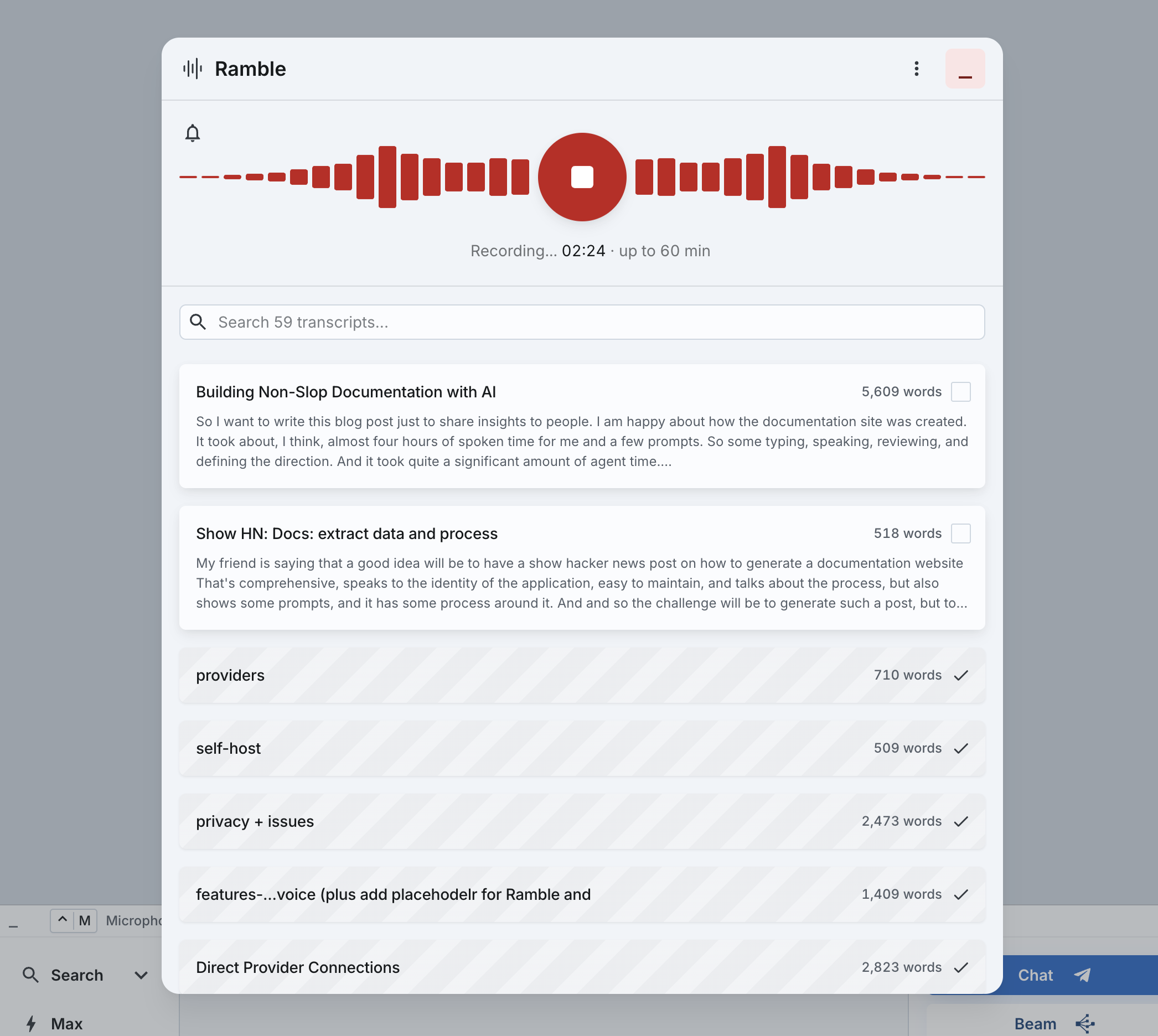
While a take runs the panel also carries a pause: Pause & mute - paused time is not recorded. The trash arms rather than acts: one tap turns it into Keep recording beside a red Confirm discard recording.
Crash-proof recording
The recording is saved every five seconds. An application reload, a closed browser or a dead battery costs at most the last five seconds. The next start notifies you of recovered takes, chipped recovered: Recovered from an interrupted recording - the tail may be missing. You can use them right away, and a recovered take always keeps its audio.
A soft tick every minute says the take is up and listening. The bell shown while recording is its toggle.
Recording in the background
Minimize the panel and move anywhere in the application - the take keeps recording and saving, on desktop and on mobile. Come back, stop it, and the transcript is ready.
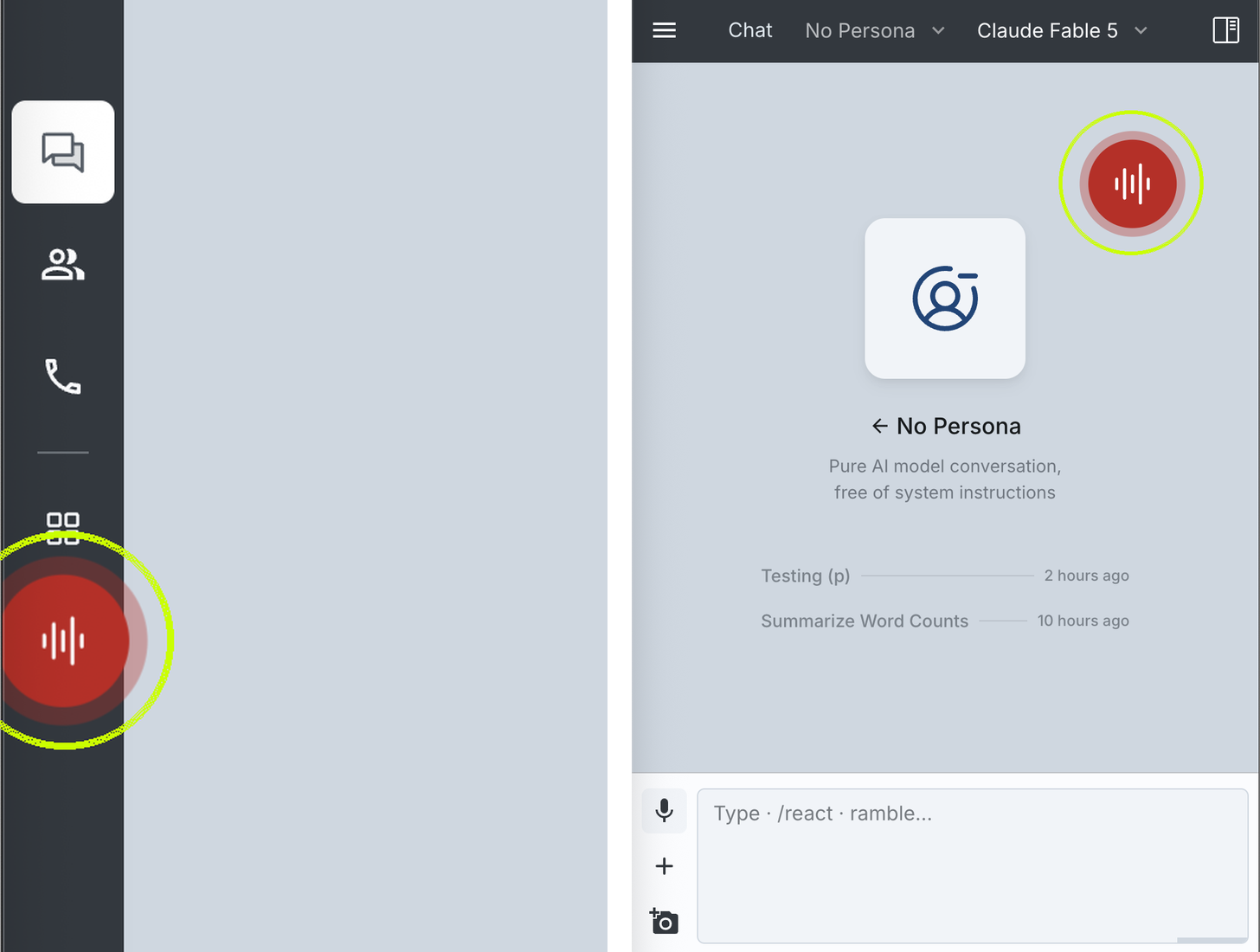
While recording, the close button becomes Minimize. On desktop, the left nav carries a red face that pulses with your voice. On mobile it is a red bubble you can drag anywhere on the screen.
Transcription runs on API keys
Fast, high-quality transcription is available on Deepgram, and we recommend it. At the time of writing, anybody creating a new Deepgram API key gets a $200 credit.
Transcription needs an engine of your own: a Deepgram or an OpenAI key, set at Settings › Voice › Input. An OpenAI service you already added counts as one, as does a custom transcription endpoint. Audio goes from your browser straight to that AI service, and the text comes back. Big-AGI's servers are not in that path; there is no server-side transcription.
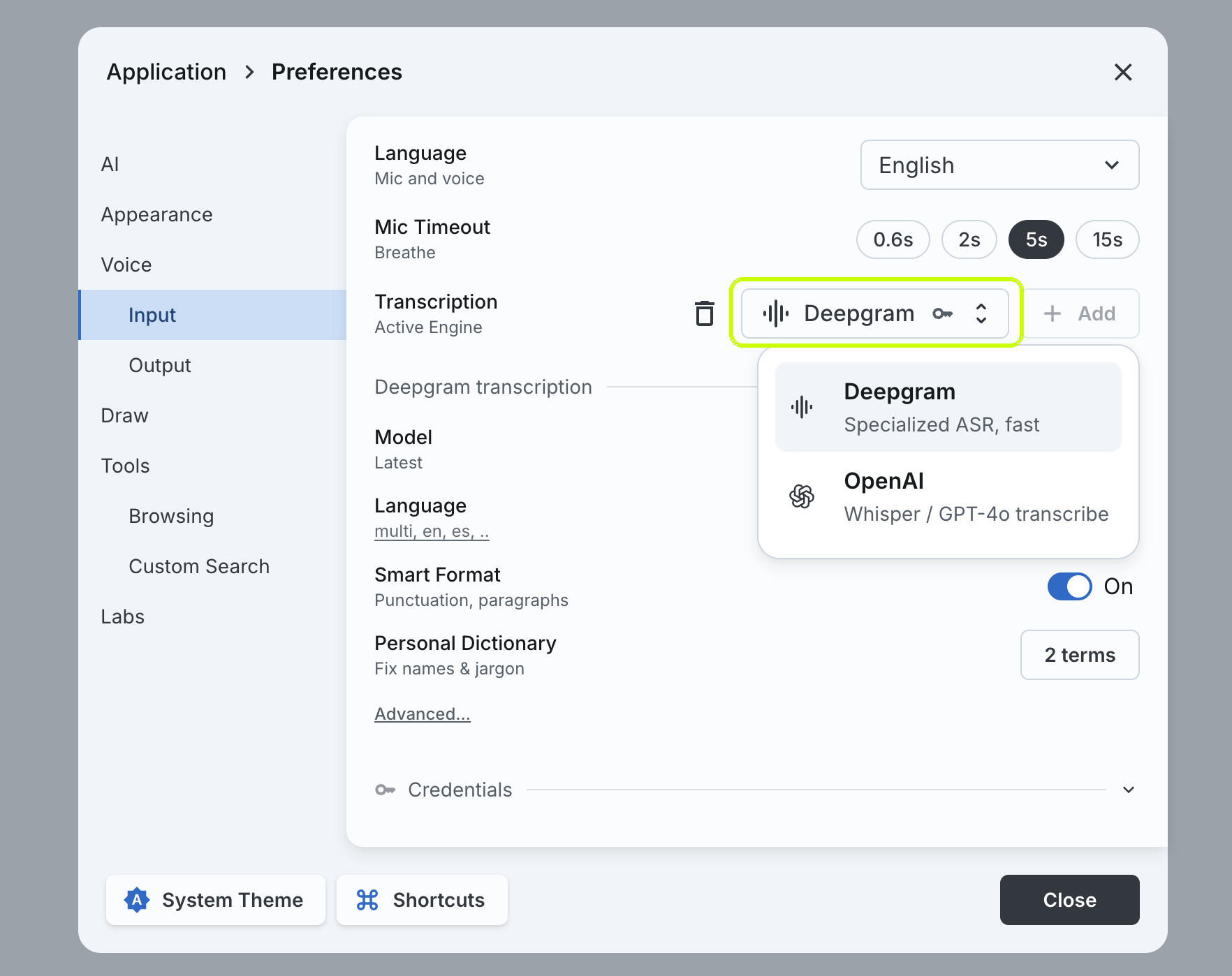
One engine transcribes a take - the one you pinned, otherwise the first with valid credentials - and a failure is not retried elsewhere.
The first transcript also triggers a title. It is written once, and a title you typed is never overwritten. Titling sends the transcript's opening and closing lines to a fast model. That is the one part of Ramble that uses your chat models.
What the engine can label
Words are the floor. Each engine has its own section at Settings › Voice › Input, most of it behind Advanced...:
| Setting | What it adds |
|---|---|
Smart Format | punctuation and paragraphs - on by default, Deepgram |
Label Speakers | Speaker 0: prefixes through the transcript, one per voice |
Label Topics | the topic chips on the card; hovering one highlights its span in the transcript - Deepgram |
Label Sentiment | one chip - positive, neutral or negative - carrying the score in its tooltip, Deepgram |
Personal Dictionary | up to 100 names, brands and jargon terms, sent with every transcription |
Detect Topics in the Ramble menu asks for topics take by take, whatever the engine section says. An engine that cannot label them returns words only. Some models ignore the dictionary, and its label then reads Unused by this model.
Where the recording lives
Audio bytes stay in this browser's IndexedDB, on the machine that recorded them. They never reach a Big-AGI server, and they never sync. Everything else travels: the transcript with its language and topics, the title, dates and review state. The recording's description travels too - duration, format, capture time, device, and the chat it started from.
A ramble reaches your other devices once two things are true: a first non-empty transcript exists, and you are on Pro pro. A take with no words in it never leaves the device. A copy that arrived by sync can be read but not replayed.
Chats, personas, rambles and notifications stay on this device and browser only, unless you subscribe to Pro: cloud backup and multi-device sync (1 GB). On Open there is no sync. Disabling sync never deletes local data.
Ramble options
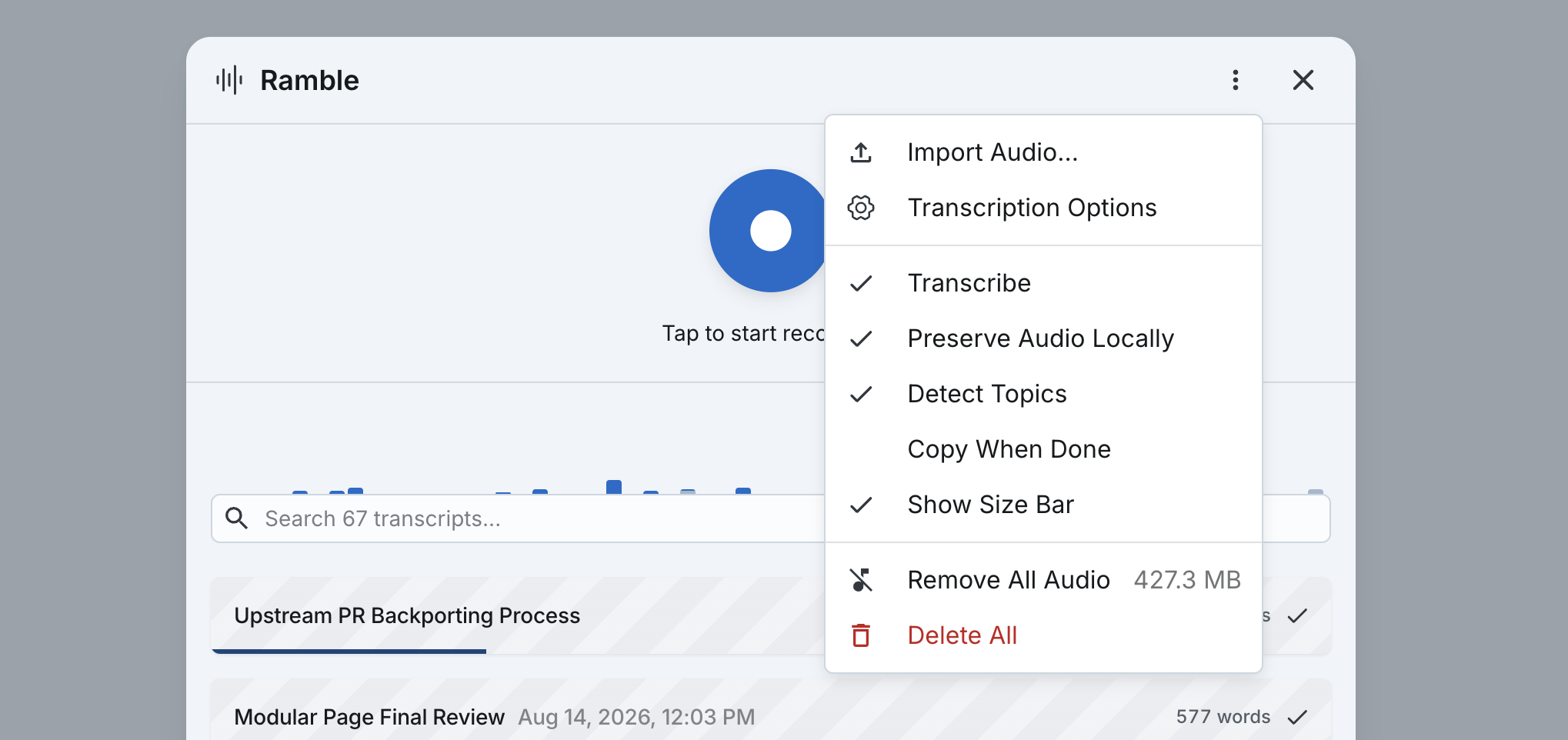
The overflow menu holds five toggles:
| Menu item | What it does | Default |
|---|---|---|
Transcribe | Transcribes each take as soon as it stops. | |
Preserve Audio Locally | Keeps the audio file after a transcript lands; available while Transcribe is on. | off |
Detect Topics | Asks for topic labels; Deepgram only. | |
Copy When Done | Puts each fresh transcript on the clipboard. | off |
Show Size Bar | Draws each recording's relative size on its collapsed card. | off |
The rest of the menu acts rather than toggles. Import Audio... transcribes an existing file the same way, taking its file name as the title. There is no length or size limit. Transcription Options opens Settings › Voice › Input. Remove All Audio names the megabytes it would free, and Delete All empties the library. While a take is running, Continue minimized joins the top of the list.
By default, audio is deleted from the device the moment a transcript lands. Silence, failed transcriptions and recovered takes keep their audio. Deleting a ramble deletes its audio immediately.
Once the audio is gone, the transcript can be edited but never re-transcribed. To re-transcribe local audio, clear the transcript in the editor: Transcribe re-arms for another pass.
Troubleshooting
| What you see | What it means | What to do |
|---|---|---|
Recording stopped: reached 60 minute cap | The hard limit. Everything up to it is saved. | Start the next take. |
Recording stopped: reached 100 MB cap | The size limit. An hour at this quality is about 55 MB, so the time cap normally trips first. | Start the next take. |
Recording interrupted: no audio received | The recorder stopped delivering data for 15 seconds - a suspended tab, or an input device that died. Silence does not trip this. | Check the input device, then record again. |
Microphone disconnected | The input device went away mid-take. | Reconnect it; what was recorded is kept. |
Audio channel busy | The audio channel was already in use. | Start the take again, or reload the application. |
error, with the service's own message | The transcription request was refused. | Fix what the message names, then press Transcribe. |
no speech | The transcription ran and found no speech. | Play the take back to check the input, then record again. |
A take under a second is discarded - Recording under 1s - discarded - and dictation keeps anything over 0.3 seconds.
Related
BIG-AGI
Resources
© 2026 Token Fabrics·Built with passion in San Diego