
Connect an Azure OpenAI resource
Azure asks for two fields rather than one - a resource endpoint and a key - and lists nothing until you have deployed a model yourself.
Azure Supported Models ->Browse documentation
24 providers
Alibaba CloudAnthropicAzure OpenAIAWS BedrockCerebrasCohereDeepseekGoogle GeminiGroqLM StudioLocalAIMetaAzure asks for two fields: a resource endpoint and a key, both issued by your own cloud subscription. Big-AGI supports the classic Azure OpenAI Service resource shape. The newer Foundry resource enumerates models differently and is not supported yet.
The subscription behind it
An Azure subscription is the prerequisite, usually one you or your company already pay for. Usage lands on the Azure invoice. The enforceable limit is an Azure Cost Management budget on that subscription.
Creating the resource and deploying a model
- Create the resource from the portal. Its Basics tab asks for Subscription, Resource group, Region, Name and Pricing Tier (Microsoft's own steps). Region decides which models you can deploy, and changing it later means a new resource. Check availability by region first. Opinion, July 2026: East US, West Europe and Australia East carry the widest selection.
- On the Network tab take the first option,
All networks, including the internet, can access this resource.- the default. The other two put the resource behind a virtual network or a private endpoint. Nothing reaches it from your browser or from the Big-AGI fast edge servers. The failure reads as a bad key. - Deploy at least one model at ai.azure.com. Nothing is callable before this happens.
- Read the endpoint and
KEY 1off the resource blade.
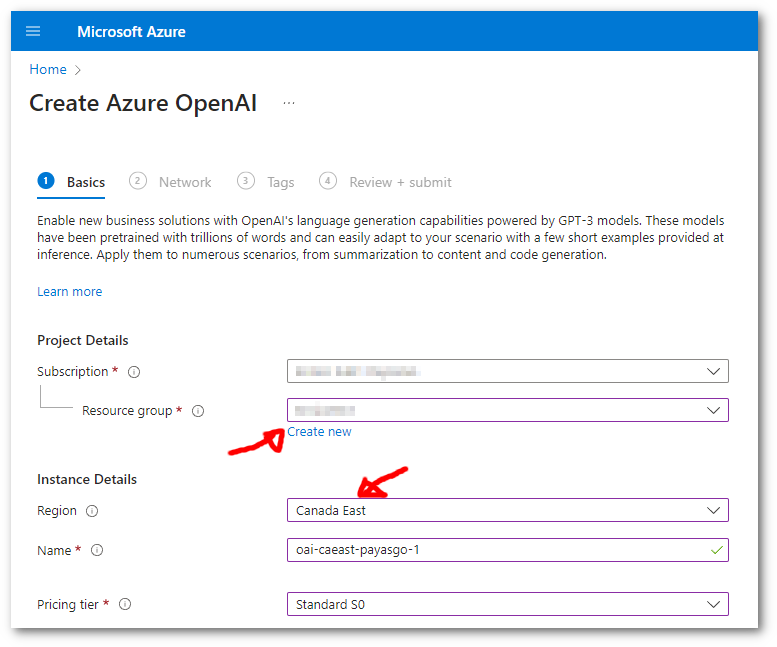
The two fields, and what fills the list
| Field in Big-AGI | What to paste |
|---|---|
| Azure Endpoint | The resource endpoint, https://<resource>.openai.azure.com |
| Azure Key | KEY 1 from the resource's keys page |
What arrives in the model list is your deployments, under the names you gave them - the deployment name is the identifier, not the model name. Deployments belong to a region, so a resource in one region shows nothing you deployed in another.
Two API paths behind one endpoint
| Path | When Big-AGI takes it | What it calls |
|---|---|---|
| v1 | GPT-5-class models, on by default | /openai/v1/responses, no deployment id |
| Deployment-based | Older models, and whenever v1 is off | /openai/deployments/{deployment}/{function} |
The deployment name is therefore the identifier on the deployment-based path only. Listing is unaffected: the model list always comes from the deployments API. A server you operate forces the older path with AZURE_OPENAI_DISABLE_V1=true (keys held by a server you operate).
Filling both fields in Big-AGI
Ctrl + Shift + M opens Models; press More Services if the Setup AI Models wizard is in front. Then Add -> Azure OpenAI, fill both fields, and press Models (add and manage your keys).
Direct Connection needs both fields
Direct Connection can be turned on once both the endpoint and the key are in the browser. It starts off.
Direct Connection works only with your API key stored in the browser, and with an AI service that permits direct browser calls (CORS). Where it cannot be used, requests route through the Big-AGI fast edge servers instead - everything still works, within the standard upload size and time limits.
When this doesn't work
| What you see | What it means | What to do |
|---|---|---|
Azure OpenAI API Host is invalid: | The endpoint is not a well-formed URL. | Re-copy the endpoint from the resource blade |
| Web search absent on a model that has it everywhere else | Azure carries no web_search_preview tool, as of 2025-11-18, so Big-AGI removes the parameters that enable search. Nothing on screen says so. | Run that model on another AI service when the answer needs live sources |
Related
BIG-AGI
Resources
© 2026 Token Fabrics·Built with passion in San Diego