
Voice input and dictation
Turn on the microphone, dictate into the composer, hold a spoken conversation, pick a voice, and know what happens to the audio.
Browse documentation
25 providers
Alibaba CloudAnthropicAzure OpenAIAWS BedrockCerebrasCohereDeepseekGoogle GeminiGroqLM StudioLocalAIMetaVoice is two independent halves. Talking to it is speech recognition (our ASRx module), done by your browser or by a transcription service. It talking back is speech synthesis (Speex), done by one of five voice engines. They are configured separately and fail separately, so one can work while the other does not.
Dictating into the composer
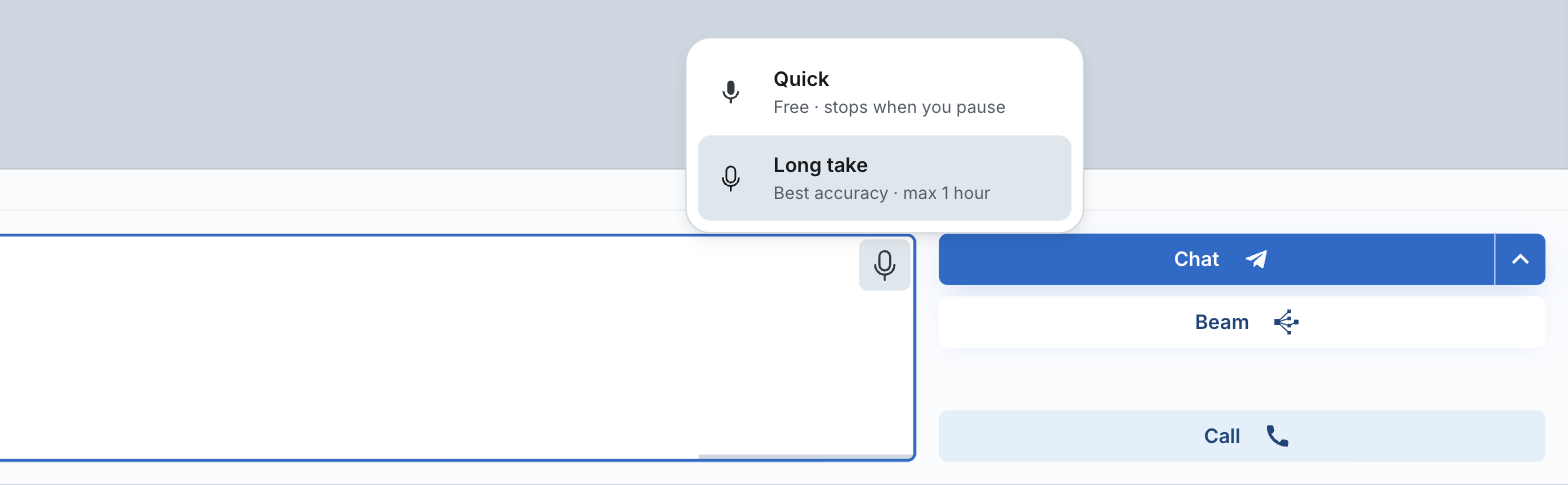
The microphone button runs one of two engines, and its icon shows which one a click starts:
| Engine | What you get | Where the words come from |
|---|---|---|
Quick · Free · stops when you pause | text in the composer as you speak, editable before you send | your browser's own recognition |
Long take · Best accuracy · max 1 hour free | the whole take transcribed in one piece when you stop | the transcription service you configured |
Long take is picked for you as soon as a Deepgram or OpenAI transcription key exists, Quick otherwise. Hover the microphone on desktop, or tap it on mobile, to switch; the choice sticks until you change it. On mobile, picking an engine also starts the recording.
Ctrl + M starts and stops the microphone. While a take is live the shortcut bar swaps in these:
| Key | While the microphone is live |
|---|---|
Enter | Send - fires once the transcript lands |
Ctrl + Enter | Beam |
Esc | Done - stop, and keep the words |
Quick stops itself after a silence, its length set by Mic Timeout at Settings › Voice › Input (5 seconds by default). Long take has no silence detection, so you stop it yourself. You can keep typing while it transcribes: the transcript lands at the cursor, and the recording is then deleted. If the service refuses, one retry runs. If that fails too the audio is kept: Transcription failed - the recording is saved in the Ramble library, transcribe it from there.
The same microphone sits on the Scratchpad and on the Beam inputs.
On Open the microphone is the browser's own recognition, with live text as you speak. A Voice Continuation button re-arms it after each send. There is no long take there - no switcher, no Scratchpad or Beam microphone - and the live-take keys are Ctrl + M for Mic · Send and Esc for Mic · Stop. Nothing on that build uses the transcription settings yet.
Ramble
Ramble records one take of up to 60 minutes and transcribes the whole file free - where to start one, what a reload costs, and what is kept: an hour of speech, transcribed whole.
Holding a spoken conversation
A call is recognition, model generation, and synthesis - three phases in turn. Latency is higher than a realtime voice model; in exchange the call runs on the chat models and the data you already have. Switch to the Calls app, or press the call button in a chat or on an open persona. The call carries that chat's context, or starts with none.
The calls app reports on three things before it dials:
The chat is empty. Calls are effective when the caller has context.
Speech recognition should be good to go.
Voice synthesis should be ready.

all three green, in the footer:   Ready, Set, Call
In the call: Push To Talk while you speak, or leave it listening. Two spoken commands are built in - Stop. makes the assistant hold its answer, Goodbye. ends the call. Ctrl + M still toggles the microphone.
The call panel sets how a turn ends, under Microphone. Start is Push to talk (a click per turn) or Always on; always-on advises a headset, because the mic may hear the reply. Send after is the silence that sends your sentence. Custom holds a value for calls only: 1s, 2s, 5s or 15s, 2s by default. Settings follows Mic Timeout instead, the same value dictation uses.
Starting to talk stops the assistant talking. The microphone and the speaker are arbitrated over one audio resource, and the microphone wins. Hanging up cuts playback the same way.
Choosing a voice - synthesis
Five engines synthesize speech, configured in Settings: some run on the AI service keys you already added, some take a key of their own. One engine is active at a time, or Auto picks.
| Engine | Configuration | What you can change |
|---|---|---|
| Your browser's own voices | No setup | Voice, speed, pitch |
| ElevenLabs | That vendor's key | Model, voice |
| Inworld | That vendor's key | Model, voice, speed |
| OpenAI | Your existing OpenAI key, or a different one | Model, voice, speed - and an instruction, on the Expressive model |
| A local speech server | Its network URL | Model, backend |
Each engine ships with a default voice, and the preview button reads the same line every time - Hello, this is my voice. A voice is stored as an engine plus its settings.
Pin a voice to a persona and every chat with that persona speaks in it. That includes the line it opens a call with: what a persona is. Outside calls, replies stay silent until Speak Chats at Settings › Voice › Output says otherwise:
Speak Chats | What is spoken |
|---|---|
No | nothing - the default |
Start | the first paragraph |
AI Brief free | a short recap of the message, read back by the persona |
Full | the whole message |
Speak Cost Guard caps what reaches the voice engine at 4096 characters, about three minutes of speech. It is on by default. One reply can always be spoken from its message menu's Speak.
All five engines exist in every version (optional services).
Where the audio goes, and what is kept
| Feature | Where the audio goes |
|---|---|
the microphone button, Quick | your browser turns speech into text; Big-AGI receives the text, not the audio |
the microphone button, Long take free | records like a Ramble: the audio goes from your browser to the transcription service you configured (Deepgram or OpenAI) |
Ramble | audio in this browser's storage on this device, then straight to the transcription service you configured |
| synthesis | the text goes to the voice engine you picked |
Whether recognition runs on the device or at the browser vendor's service is the browser's choice, not Big-AGI's. The full account of what leaves your machine, and by which route: what leaves your browser.
Browsers and devices
The rows below are about Quick, the browser's own recognition, and about calls, which use the same engine.
| Browser | What happens |
|---|---|
| Chrome · Edge · Safari | recognition works |
| Brave | blocked - Speech recognition is not supported in Brave. Please use Chrome, Edge, or Safari. |
| iOS | a warning rather than a block - Not tested on this browser/device. |
| no recognition at all | Speech recognition API is not available in this browser. |
Brave is blocked deliberately, because it exposes the interface and then returns nothing. Long take records with the ordinary media APIs, so it runs in Brave and in every browser above. Synthesis has no restriction either: any browser can play the audio back.
Troubleshoot - audio errors
| What you see | What it means | What to do |
|---|---|---|
Microphone access blocked by the user. Enable it in your browser settings to use speech recognition. | The site permission is denied. | Allow the microphone for this site, then reload. |
Speech Recognition permission denied. Check your System Settings. | The operating system is blocking the browser. On macOS Speech Recognition is a permission separate from Microphone, so granting the microphone does not grant it. | System Settings -> Privacy & Security -> Speech Recognition, tick your browser, then quit and reopen it. That pane's path is as documented in September 2024. |
Audio capture failed (...). Please try again. | No usable input device. | Check the input device, and that nothing else holds it. |
Network communication required to complete the service, but failed. | Browser recognition could not reach its service. | Retry on a stable connection. |
Issue starting the speech recognition. | A second start was requested before the first stopped. Calls and the Open composer raise this one. | Wait a moment and press Ctrl + M again. |
Microphone channel busy | Another capture holds the microphone - a Ramble take, or a call. | Stop that one, then start again. |
| Nothing is spoken back | Autoplay is blocked until you interact with the page. | Click once in the page, then retry. |
Related
BIG-AGI
Resources
© 2026 Token Fabrics·Built with passion in San Diego